How to Write Your First Guitar Tab in Guitar Pro 8
Guitar Pro 8 is the standard tool for writing and reading tablature, and its interface can look intimidating the first time you open it. It is not. You can have a playable tab on screen in about five minutes.
Here is how to create tabs in Guitar Pro 8, one step at a time.
Step 1: Create a new file
Open Guitar Pro 8 and click New File, or press Ctrl+N.

Step 2: Choose your instrument
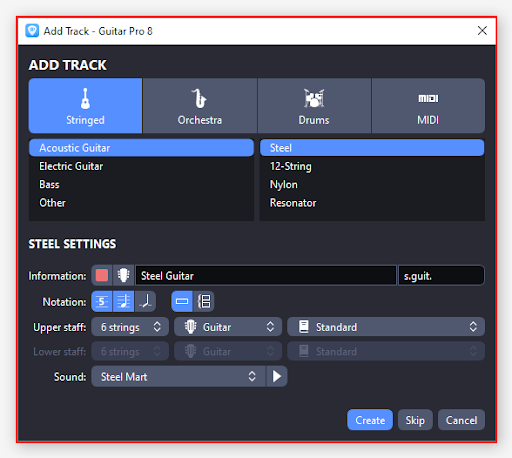
The Add Track window opens. Pick a family along the top, Stringed, Orchestra, Drums or MIDI then the specific instrument underneath. For a standard six-string, choose Stringed and then Acoustic or Electric Guitar.
Step 3: Set your tuning
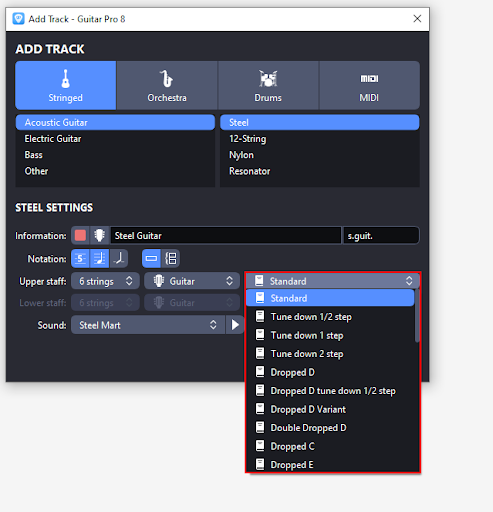
Still in the same window, open the tuning dropdown on the Upper staff row. Standard is the default, but the common alternates are all here: Drop D, Double Dropped D, Dropped C, and the half-step and full-step down variants. Set this before you start writing, changing tuning later shifts every fret number you have already entered.
Step 4: Click Create
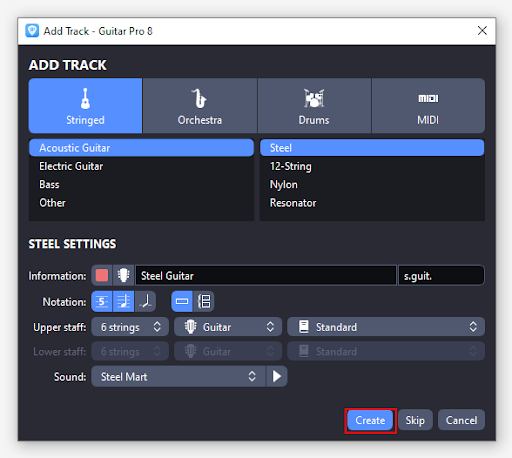
With your instrument, tuning and sound chosen, click Create. Guitar Pro builds the track and hands you your first empty bar.
Step 5: Meet your first bar
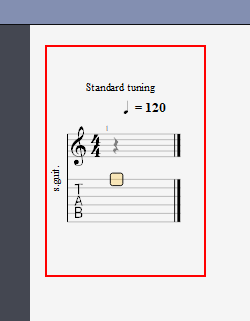
Your new track appears with one bar ready to edit. The upper staff is standard notation, the lower staff is the tab. Anything you type into the tab appears in the notation above automatically, which is useful if you read one better than the other.
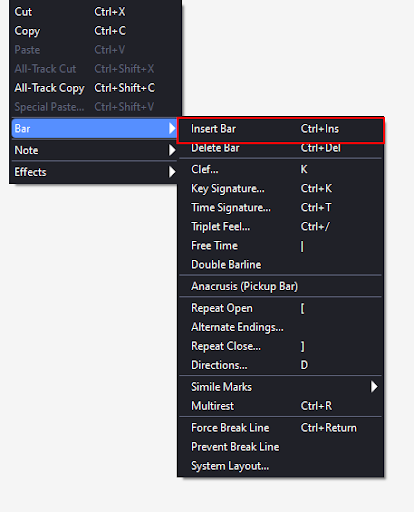
Step 6: Add more bars
One bar will not get you far. To add another:
- Right-click and choose Bar → Insert Bar, or
- Press Ctrl+Ins
Step 7: Write the tab
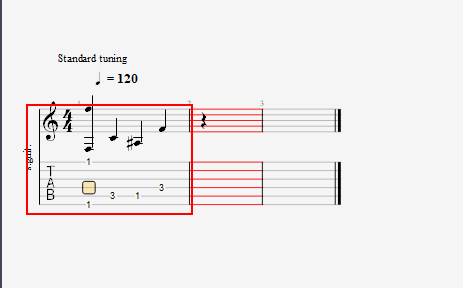
Each of the six lines is a string. The bottom line is your low E, the top line is your high E.
- Click the line for the string you want, or move between strings with the up and down arrow keys
- Type the fret number — 0 means an open string
- Move along the bar with the right arrow key and repeat
Wrapping Up
That is a working tab. Create the file, pick the instrument, set the tuning, then click a string and type a fret. Everything else Guitar Pro does note duration, bends, slides, hammer-ons, full multi-track arrangements is built on top of that same loop.
For more walkthroughs of the software you actually use, LearningComputer.com publishes free step-by-step IT and technology tutorials. And if your business needs content that brings people in the way a good tutorial does, Kash Data Consulting builds SEO and digital marketing strategies that put you in front of the right audience. Get in touch to find out how.