
How Digital Audio Works: Sample Rate and Bit Depth Explained
Sound in the real world is smooth, with air pressure rising and falling in endless detail. A computer cannot store that, because a computer stores numbers.
So digital audio comes down to a single task. Turn a smooth wave into a list of numbers, then turn it back without anyone noticing.
Two settings control that swap: sample rate and bit depth. Both get misread constantly, and understanding them properly will change how you set up a session.
Sampling: Slicing Time
A converter measures the incoming voltage at fixed moments and writes down each reading. Each reading is one sample.
- Sample rate is how many readings happen per second, and it is written in kHz.
- A rate of 44.1 kHz means 44,100 readings every second.
- A rate of 48 kHz is the standard for video work.
- Rates of 96 kHz and 192 kHz show up in some studio workflows.
Most people picture a staircase, a jagged copy of a smooth curve that gets smoother as you add samples. That picture is easy to hold and completely wrong, and it leads people to bad decisions about high sample rates.
Why 44.1 kHz Is Not Random
The number comes from a mathematical proof called the Nyquist-Shannon sampling theorem.
- A wave can be rebuilt perfectly if you sample at more than twice its highest frequency.
- Human hearing stops near 20 kHz, and for most adults it stops well below that.
- Twice 20 kHz is 40 kHz, and the extra 4.1 kHz gives the filter room to work.
The key word is perfect. Below the Nyquist limit the rebuild is not a rough copy but an exact one. The output is a smooth wave rather than a staircase, because the filter recovers the only curve that could have produced those samples.
Aliasing and Why Filters Matter
Suppose a tone above half the sample rate reaches the converter. It does not simply vanish, and instead folds back into the audible range as a completely new tone.
- This false tone is called aliasing, and it sounds harsh and metallic.
- It has no relationship to the source material, so you cannot remove it later.
- Converters run an anti-alias filter before sampling to prevent it.
That gap between 40 kHz and 44.1 kHz exists to give the filter room. Early filters needed the margin, while modern converters use oversampling to make the job easier.
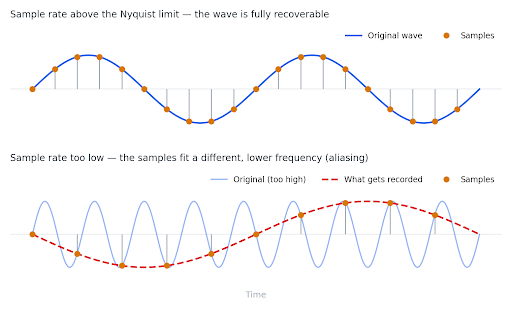
Figure 1: Above the Nyquist limit, the samples describe one possible wave. Below it, the same samples fit a lower tone that was never in the source.
So Is a Higher Sample Rate Better?
- For capturing audible sound, no, since 44.1 kHz already covers everything you can hear.
- For processing, sometimes, because effects that add harmonics get more room before aliasing.
- For time-stretching and pitch-shifting, occasionally useful.
- For file size and processor load, always worse, and the cost scales in a straight line.
Recording at 192 kHz to make a vocal sound better misunderstands what the setting does. Recording at 96 kHz for a session full of saturation plugins is a defensible choice.
Bit Depth: Slicing Level
Sample rate divides time, while bit depth divides loudness. Each sample has to be stored as a number, and bit depth sets how many values that number can take.
- A 16-bit file gives 65,536 possible steps per sample.
- A 24-bit file gives roughly 16.7 million.
- A 32-bit float file works differently, storing a value and an exponent.
A reading often lands between two available steps and gets rounded to the closer one. That rounding error is called quantization noise, and it sits underneath your audio as a noise floor.
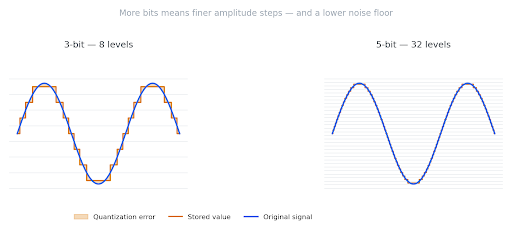
Figure 2: Bit depth sets how many steps are available. The shaded gap between the signal and the stored value is the rounding error. It is exaggerated here at 3 and 5 bits, since 16-bit steps would be invisible at this scale.
What Bit Depth Really Controls
Here is the part that gets muddled constantly. Bit depth does not sharpen the loud parts of your track, and instead sets how far down the noise floor sits.
- Each additional bit drops the noise floor by roughly 6 dB.
- A 16-bit file gives a dynamic range near 96 dB.
- A 24-bit file gives a dynamic range near 144 dB.
Two terms get mixed up here, and they are not the same thing. Dynamic range is the span from the loudest possible signal down to the noise floor, and it is fixed by the format.
Signal-to-noise ratio compares your actual recorded level to that same floor, so it depends entirely on how you set your gain. A 24-bit take recorded too quietly has excellent dynamic range and a poor signal-to-noise ratio.
That 144 dB figure is theoretical. Real converters hit analog circuit noise long before reaching it, and even top-end gear stops near 120 dB. The extra bits still help, but they do not buy what the arithmetic suggests.
What This Means in Practice
This is why the standard advice exists: record in 24-bit and deliver in 16-bit.
- Recording in 24-bit lets you track conservatively without pushing levels near clipping.
- That spare room is your headroom, so a sudden loud passage will not distort.
- Digital clipping cannot be undone, while a quiet take can simply be turned up.
- A 16-bit release is fine, because 96 dB beats almost any listening environment.
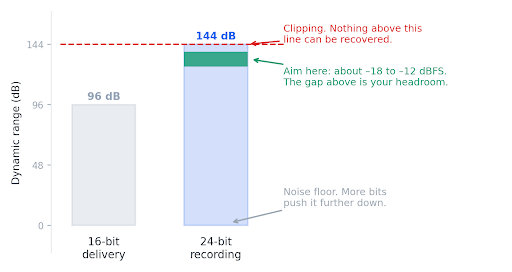
Figure 3: Why 24-bit is the safer place to record. The extra range is not sharper sound. It is room to leave the loud parts alone.
Here is the single takeaway. Stop chasing hot input levels, a habit inherited from tape where a low signal meant audible hiss. In 24-bit, peaks near -18 to -12 dBFS are comfortable and safe.
Dither
Converting from 24-bit to 16-bit throws away eight bits. That truncation creates distortion tied to the signal, and the ear picks it up quickly.
- Dither adds a tiny amount of random noise before the conversion.
- It turns correlated distortion into plain noise, which is far less noticeable.
- Apply it once at the final export, and never in the middle of a chain.
For the practical side, our REAPER recording tutorial shows where these settings live. The mixing signal chain guide picks up once the audio is recorded.
Where the Numbers Land
Sample rate and bit depth together set your file size, and the arithmetic is simple. Multiply sample rate by bit depth by channel count.
- CD audio at 44.1 kHz and 16-bit stereo runs about 10 MB per minute.
- The same music at 96 kHz and 24-bit runs about 33 MB per minute.
- A one-hour session with 24 tracks becomes a storage problem quickly.
This is also the baseline that compressed formats are measured against. When an MP3 file is a tenth the size, the difference is whatever the codec decided you would not miss.
Summary
- Digital audio stores sound as numeric readings taken at fixed moments.
- Sample rate sets how often those readings happen, and 44.1 kHz already covers human hearing.
- Below the Nyquist limit the rebuild is mathematically exact, so there is no staircase.
- Bit depth sets how finely level is measured, which moves the noise floor rather than the loud parts.
- Dynamic range and signal-to-noise ratio are not the same, since one is fixed and one depends on your gain.
- Record in 24-bit for headroom, then deliver in 16-bit with dither applied once at export.
Solid fundamentals make every tool easier to learn, whether you are setting up an audio interface or troubleshooting a codec problem. LearningComputer.com publishes clear, practical technology guides for people who would rather understand their tools than memorize button presses. Explore our library to keep going.
